Should a School Use a Register, Excel or an App for Attendance?
Use an app if you want parents told the same day and a record nobody can quietly change. A paper register still works for a very small school. Excel sits in between: better than paper for reports, but it does not tell parents anything by itself.
Here is how the four common options compare, so you can pick what fits your school.
The short comparison
| Paper register | Excel sheet | Phone app | Biometric | |
|---|---|---|---|---|
| Time for the teacher | Slow to total up | Needs typing after class | Quick, marked in class | Quickest at the gate |
| Accuracy | Depends on handwriting and totals | Depends on typing and formulas | Fewer manual totals | Good for who arrived, not for who sits in class |
| Same-day message to parents | No | No, unless someone sends it by hand | Yes, if the app supports alerts | Only if linked to messaging |
| Reports | Counted by hand | Possible with effort | Ready when needed | Ready when needed |
Paper register
A register costs almost nothing and needs no phone or power. Every teacher already knows how to use it.
The trouble starts at month end. Someone has to count presents class by class, and one tired addition can change a child's percentage. The register is also in one place, often the staffroom, so the office cannot see who is absent until it is collected.
Telling parents is the biggest gap. A parent learns about an absence only when they are called, and that call is usually made late or not at all.
A register is fine for a small class where the teacher knows every family and can phone them. It struggles once you have many sections.
Excel sheet
Excel is a good step up from paper. Totals and percentages come from formulas, and you can filter by class or date.
But it has limits for daily attendance:
- Someone must type the data in after the teacher marks it on paper, so the work is done twice.
- One broken formula or a sheet saved in the wrong folder can give wrong totals without anyone noticing.
- Files get copied. Soon there are three versions, and nobody knows which is right.
- It cannot send a message to a parent.
Wikipedia's page on spreadsheets lists a lack of auditing and revision control as a known weakness, because it becomes hard to tell who changed what and when. That matters for attendance, which parents, boards and inspectors may ask about later.
If you must use Excel, keep one master file, protect the formula cells, and keep a dated backup each week. For the wider comparison, see school software versus registers and Excel. We also wrote about the same choice for money records in should your school keep fee records in Excel or use software.
Phone or tablet app
With an app, the class teacher marks attendance on a phone in the first minutes of the period. The office sees the result straight away, with no copying.
The big gain is the parent alert. If a child is marked absent at 9 a.m., the parent can get a message that morning rather than a week later. Parents in India already live on WhatsApp and SMS, so this is the kind of message they notice.
A mobile app is simply software that runs on a phone or tablet. For attendance, check these before you choose one:
- Does it work when the school Wi-Fi or mobile data is weak?
- Can the office see which classes have not been marked yet?
- Does it keep a record of every correction and who made it?
- Can parents be told the same day?
- Can you get reports by student, class and section without extra work?
Biometric attendance
Biometrics means identifying a person from a body trait such as a fingerprint or face. At a school gate or staff room it proves that someone physically arrived, so it suits staff attendance well.
For students it has two catches. First, a child at the gate is not necessarily in the classroom, so class attendance still needs marking. Second, biometric data is sensitive. Wikipedia notes that data collected at enrolment may be used in ways the person did not agree to, and that a compromised fingerprint or face cannot be reissued like a password. Tell parents clearly what you collect and why, and ask a legal professional about consent rules for children before you start.
Many schools use a mix: biometric or card at the gate for staff, and an app for class attendance.
So which one should you pick?
Ask three questions:
- How many sections do you have? One or two, a register may do. Five or more, the totals and follow-ups start eating teacher time.
- Do you want to tell parents the same day? If yes, you need an app or a system that sends messages. Neither paper nor Excel can.
- Will someone ask for proof later? If yes, choose a method that records who changed what.
A simple route: start by marking attendance on a phone for one class for a month. Compare how long it takes against the register, and see how many parents respond to alerts.
What staff attendance needs
Teacher attendance matters too, because it feeds leave and salary. If you are weighing options there, see school payroll software for staff salary and leave.
See it for your school
If your problem is slow registers, month-end counting and parents who learn about absences too late, look at 8plabs school attendance software. The page shows marking on phones, tablets or biometric devices, parent alerts for absences and late arrivals, reports by class and student, and a record of corrections. It also covers staff attendance linked to payroll. The page has short walkthrough videos on marking a class and reading attendance reports.
If you use the school app idea for parents, 8plabs can talk through how it fits your setup. Open the page and book a demo.
Watch it in School App
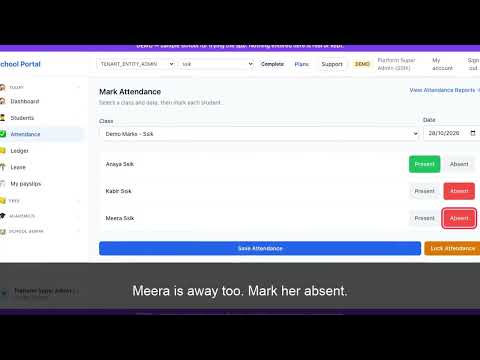 Mark today's attendance for a class
Pick a class, mark each student present or absent for today, save, and see the day's attendance recorded.
 Read a class attendance report
Open Attendance Reports, choose a class and a date range, and read who was present and absent.
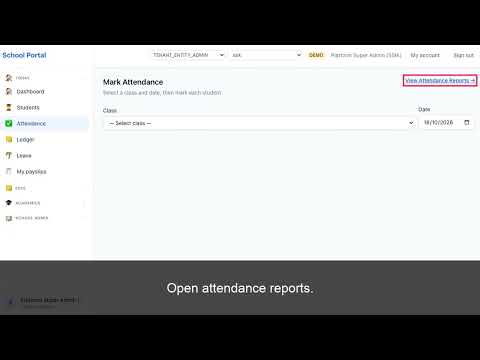 View attendance reports
Open the attendance reporting area and choose a report view.