Register, Excel or Software: How to Keep Student Records?
Keep the admission register as your permanent legal-style record, but do not rely on it alone. For a school with more than a few hundred students, software is the safest way to find a student fast, issue certificates and answer reports. Excel is a fair middle step for a small school, if one person owns the file and keeps backups.
The right choice depends on how many students you have, how often you search for them, and how many reports you must send out each year.
What a student record should hold
Whatever you use, each student needs the same core details in one place:
- Admission number and date of admission
- Student's full name, date of birth and gender
- Class and section, updated every year
- Guardian names, phone numbers (one that works on WhatsApp) and address
- Previous school and transfer certificate details, if any
- Documents seen at admission, such as birth proof, with the date checked
- Fee concession or category details, if your school gives them
- Date of leaving and reason, once the student leaves
If you want to design the form itself, see our guide on what a school admission form should ask for.
One more identifier is now worth storing. APAAR is a 12-digit permanent academic ID for students, and the APAAR portal says it needs a valid PEN (the UDISE+ identifier) and parental consent for minors. Keep a column or field for both. Check the portal for the current process.
Register, Excel or software: the honest comparison
| Paper register | Excel | Software | |
|---|---|---|---|
| Finding a student by name or phone | Slow; you must know the page | Fast with search and filters | Fast, and shows the full history |
| Spelling and duplicate mistakes | Common | Common unless someone checks | Fewer, because one record is reused |
| Transfer certificate, bonafide | Written by hand each time | Typed again each time | Made from the stored record |
| Reports for the board or UDISE+ | Counted by hand | Possible with formulas | Pulled from the same data |
| Backup | One copy, can be lost or damaged | Needs discipline | Handled for you |
| Several people working at once | One at a time | Risky, files get copied | Designed for it |
The paper register
A bound register is simple, needs no electricity and is hard to edit quietly. That is its strength. Many schools keep one as the permanent record, and that is sensible.
Its weakness is search. When a parent calls and says "my son was in Class 6 around 2019," someone has to turn pages. Counting students by class, gender or category for a report means a long afternoon.
Excel
Excel is a big step up for finding people. You can search by name, filter by class and sort by admission number. It costs nothing if you already have it.
Excel also fails in predictable ways:
- Two staff members each keep a copy, and nobody knows which is current.
- Someone types a class as "6A", "VI-A" and "6 A" and filters stop working.
- A phone number gets overwritten and the old one is lost.
- The only copy sits on one office computer.
If you use Excel, follow a few rules. Use one file, one owner and fixed spellings through drop-down lists. Never delete a row when a student leaves; mark the status instead. Save a dated backup weekly to a pen drive or cloud drive.
Software
A student information system is, in the words of Wikipedia, a management information system used to manage student data. Typical functions listed there include registration and enrollment, attendance, grades and communication between school and parents. The same article notes that these systems hold sensitive personal data, so security matters.
For a school office, the practical gain is that you type a student once. The certificate, the ID card, the fee record and the attendance list all read from that one entry. When a student's class changes at the start of the year, it changes everywhere.
What to decide on: finding a student, transfers and reports
Finding a student
Ask how long it takes today to answer: "Which class was this child in, who is the guardian and what is the fee position?" If the answer is more than a minute, the system is costing you time every day.
Transfers
When a student leaves, you issue a transfer certificate, and when one joins, you receive one. The certificate repeats details already in your record. Typing them again is where wrong dates of birth and spelling errors enter. A stored record that generates the certificate removes that step. Our free bonafide certificate format and student ID card format show what these documents usually carry.
Board and UDISE+ reports
Boards and the government ask for student counts and student-wise details. UDISE+ is the national school data system, and its official site is udiseplus.gov.in. The exact fields and deadlines change, so check the current notice from your board or state education department before each cycle.
The point for record keeping is simple. If your data is clean and uniform, with one spelling per class and one date format, a report is a filter and a count. If it is scattered across registers and files, a report is a week of rework.
A simple way to choose
- Under about 100 students, one office person: Register plus a well-kept Excel file is workable.
- 100 to 300 students, or any branch, bus or fee tracking: Excel starts to strain. Try software for the records first.
- Larger schools or several people entering data: Use software. Keep the paper register as a permanent copy.
- Moving from paper: Enter current students first, then past students as certificates are requested.
Whichever you choose, check three things every term: every student has a guardian phone number, every admission number is unique, and someone has tested restoring from a backup.
You can read our longer comparison in school management software vs Excel. For fee records in particular, see should your school keep fee records in Excel or use software.
Keep student records in one place
If your office still juggles enquiry diaries, admission forms and registers, 8plabs admissions and student records brings enquiries, admissions and student records into one list. Transfer certificates, bonafide letters and ID cards are made from the stored record, so you do not type the same details again. The page also has short walkthrough videos on adding a new student and managing students.
If you have a special need, such as moving old registers or matching a board format, 8plabs can talk it through. Open the page and book a demo to see it with your own records.
Watch it in School App
 Add a new student to the school
Open the Students list, add a new student with a guardian and a class, save, and find the student on the roll.
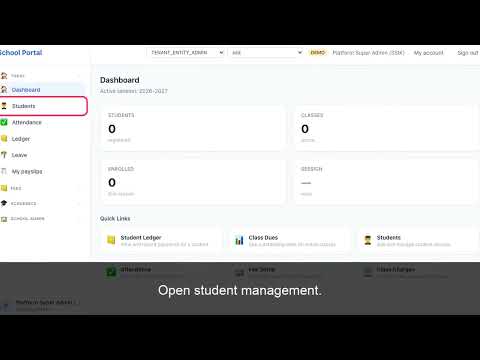 Manage students
Open the student management area and begin adding a student.