What Is a School ERP and What Does It Do for a School?
A school ERP is one software system that runs the daily work of a school: admissions, attendance, fees, exams, timetables and messages to parents. Instead of keeping each job in a separate register or Excel file, everything sits in one place and shares the same student records. When a teacher marks a child absent, the parent alert, the attendance report and the monthly summary all use that one entry.
If you are a principal or trustee hearing the term for the first time, this guide explains it in plain words and shows what to ask for.
What does ERP stand for?
ERP stands for Enterprise Resource Planning. Wikipedia describes it as the integrated management of main business processes, often in real time and mediated by software. Such systems typically bring accounting, payroll and other functions onto a shared database, so that departments see the same up-to-date information.
The idea began in business and manufacturing. In a school, the "resources" are different: students, teachers, classrooms, buses, fee money and time. The idea is the same. One system, one set of records, many departments.
You may also hear "school management software" or "school administration software". For most buyers these mean nearly the same thing. A student information system is the part that manages student data such as registration, grades, attendance and reports. A school ERP usually covers that and also the office side, such as fees and accounts.
What does a school ERP actually run?
Think of it as a list of jobs your school already does, moved from paper into one system.
Admissions and student records
Enquiries, application forms, admission and the permanent student record live together. Later, certificates such as a bonafide certificate can be produced from the same record instead of being typed again. See admissions and student records for how this works.
Attendance
Teachers mark attendance once. The school can then see daily totals, and parents can be told the same day if a child is absent. See school attendance with parent alerts.
Fees and payments
The office sets the fee structure, collects fees, issues receipts and sees who has dues. Parents can pay online by UPI or card rather than standing in a queue. See fee management with online payment.
Exams and report cards
Marks are entered once and flow into report cards. This saves the end-of-term rush of copying marks from sheet to sheet. See exams, report cards and results.
Messages to parents
Circulars, events and reminders go out from one place, so the principal does not depend on many WhatsApp groups. See circulars, SMS and events.
Other campus jobs
Many systems also handle timetables, homework, transport, hostel, library and payroll. Not every school needs all of these on day one.
How is a school ERP different from an LMS?
A learning management system (LMS) is software for delivering and tracking courses and learning material. It handles content, assessments, progress tracking and communication between teachers and learners.
The simple split:
| School ERP | LMS | |
|---|---|---|
| Main question | How is the school running? | How are students learning? |
| Typical content | Admissions, fees, attendance, report cards | Lessons, videos, assignments, quizzes |
| Main users | Office, principal, teachers, parents | Teachers and students |
A school can use both, and some ERPs include light learning tools such as homework and online quizzes. But if your daily headache is fee follow-up, attendance registers and report card season, you need the ERP side first.
What changes for people in the school?
- Principal or trustee: one view of fees collected, attendance and results, without waiting for someone to compile a report.
- Office staff: fewer duplicate registers and fewer hunts for last year's record.
- Teachers: attendance and marks are entered once, not copied into several formats.
- Parents: one place to see fees, attendance, results and homework, rather than calls to the office.
Is a spreadsheet enough?
For a very small school, sometimes yes, for a while. Problems show up when the same child's details are kept in three files, when two staff edit at once, or when fee dues must be matched against receipts. If you are weighing this up, read Should your school keep fee records in Excel or use software.
What should you check before buying?
- List your three biggest daily pain points, such as fee reminders, attendance or report cards. Start with those.
- Ask to see the software working on your own data, such as your own fee structure and class list.
- Ask how the price is worked out, for example per student or per module, and what is included. Our guide on what school management software costs in India explains the common models.
- Check that it suits your board. CBSE, ICSE and state boards have different report card formats.
- Ask who helps you move your existing records over.
For a longer checklist, see how to choose school management software in India.
See what a school ERP covers in practice
If your school still runs on registers, Excel and phone calls, the fastest way to understand an ERP is to see one on your own records. 8plabs school software brings admissions, attendance, fees, exams, transport, hostel, accounts and parent apps together on shared student records, so teachers and the office enter things once. Look through the features, then book a demo on that page. 8plabs will call you and show it working on your own records.
Watch it in School App
 Add a new student to the school
Open the Students list, add a new student with a guardian and a class, save, and find the student on the roll.
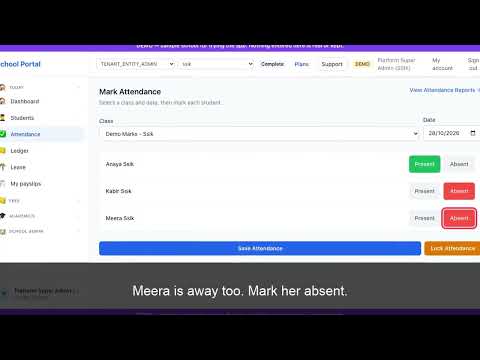 Mark today's attendance for a class
Pick a class, mark each student present or absent for today, save, and see the day's attendance recorded.
 Record a fee payment on a student's ledger
Find a student's ledger, see what is outstanding, record a payment, and see the balance go down.
 Create an exam and build a final result with weightage
Create a new exam, combine it with an existing exam into a final result where one exam counts as it is and the other is scaled down by a weightage mark, then enter marks.